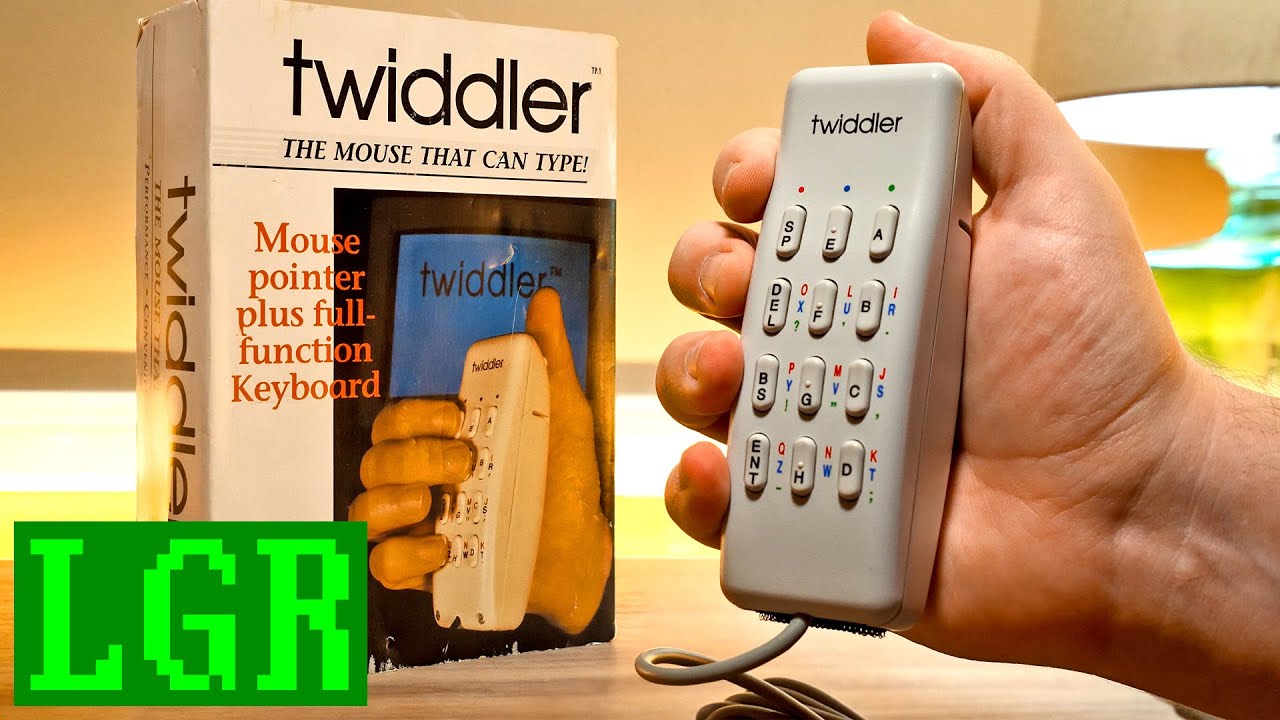
LGR Oddware: Twiddler Motion Controlled Keyboard Mouse from 1992
video description
Date: 2022-04-14
Related videos





Comments and reviews: 10
eekee
I have a Twiddler 3. :) It's much smaller. The mouse is a switch-based joystick. they have a method to use it which I can understand, but doesn't really work for me. Anyway, I was okay using it with a hand-held trackball (aka a -ring mouse-) in the other hand, except the Twiddler made my hand hurt. :( I never got used to it. The real problem is the straight lines of keys which just don't suit my hands. It's smaller as I said; I tried padding it so I wouldn't have to curl my fingers so much, but it just made some buttons too much of a stretch, especially in chords.
I didn't give up quickly. It seemed impossible to learn at first, but I slowly found myself starting to get the hang of it. I even got semi-good with it before I gave up; over 10WPM. Letters go by the alphabet which. is not really normal to try to remember as you type, but you get used to it. Numbers are weirdly unlike common keypads; they took me longer. Dot and comma are very easy, other punctuation takes longer to learn. Roughly, the more common the punctuation character, the easier it is to learn, but that'll vary by usage. I have the misfortune to be a bit of a coder. I'm thankful I had no need to learn the function or windows key chords.
Incidentally, some wearable computing hobbyists make chording keyboards with just 2 buttons. I don't know how that works, but I don't think I'd like it. At least it would be cheap, even with the best buttons. I think I'd like a braille keyboard myself, but never got around to it. I also never got around to learning the Frogpad chording layout -- simpler chords for one-handed typing on a PC keyboard if you can't find the old hardware Frogpad. I should have done that instead of buying the Twiddler.
Haha! Nice little demo there, walking past the camera.
There's a lot of familiar stuff in the old manual. Which hand. L00R lol. very little has changed. The typing tutor is on the web now, but brings up the same words. :) And yes, I found myself reaching for a regular keyboard _a lot_ at first. :D I also tend to push unfamiliar pointing devices into corners instead of straight. Funny that.
All the cheat sheets Tekgear provide are designed for use as if you're looking through the device. This works, I think, but I had to make myself get out of the habbit of turning it over to look at it. :)
You need a DOS paint program! Surely there were some? I'm saying this as someone who used or at least saw every system but MS-DOS in the 80s. Anything that could do graphics had a paint program, although you usually had to buy it. I wrote my own for my Atari 130XE, but it wasn't very good. :) But now I think about it. -websearch- Okay LGR, even I've heard of PC Paintbrush. ;) There's also the unrelated PC Paint. Curiously no paint programs on the FreeDOS ISOs, of which I don't have the latest. But I've typed too much again.
reply
I have a Twiddler 3. :) It's much smaller. The mouse is a switch-based joystick. they have a method to use it which I can understand, but doesn't really work for me. Anyway, I was okay using it with a hand-held trackball (aka a -ring mouse-) in the other hand, except the Twiddler made my hand hurt. :( I never got used to it. The real problem is the straight lines of keys which just don't suit my hands. It's smaller as I said; I tried padding it so I wouldn't have to curl my fingers so much, but it just made some buttons too much of a stretch, especially in chords.
I didn't give up quickly. It seemed impossible to learn at first, but I slowly found myself starting to get the hang of it. I even got semi-good with it before I gave up; over 10WPM. Letters go by the alphabet which. is not really normal to try to remember as you type, but you get used to it. Numbers are weirdly unlike common keypads; they took me longer. Dot and comma are very easy, other punctuation takes longer to learn. Roughly, the more common the punctuation character, the easier it is to learn, but that'll vary by usage. I have the misfortune to be a bit of a coder. I'm thankful I had no need to learn the function or windows key chords.
Incidentally, some wearable computing hobbyists make chording keyboards with just 2 buttons. I don't know how that works, but I don't think I'd like it. At least it would be cheap, even with the best buttons. I think I'd like a braille keyboard myself, but never got around to it. I also never got around to learning the Frogpad chording layout -- simpler chords for one-handed typing on a PC keyboard if you can't find the old hardware Frogpad. I should have done that instead of buying the Twiddler.
Haha! Nice little demo there, walking past the camera.
There's a lot of familiar stuff in the old manual. Which hand. L00R lol. very little has changed. The typing tutor is on the web now, but brings up the same words. :) And yes, I found myself reaching for a regular keyboard _a lot_ at first. :D I also tend to push unfamiliar pointing devices into corners instead of straight. Funny that.
All the cheat sheets Tekgear provide are designed for use as if you're looking through the device. This works, I think, but I had to make myself get out of the habbit of turning it over to look at it. :)
You need a DOS paint program! Surely there were some? I'm saying this as someone who used or at least saw every system but MS-DOS in the 80s. Anything that could do graphics had a paint program, although you usually had to buy it. I wrote my own for my Atari 130XE, but it wasn't very good. :) But now I think about it. -websearch- Okay LGR, even I've heard of PC Paintbrush. ;) There's also the unrelated PC Paint. Curiously no paint programs on the FreeDOS ISOs, of which I don't have the latest. But I've typed too much again.
reply
Andre
Mmmh. I ogled these when the guys from several universities in the US came up with the first -wearable- computers, a genre that never really took off for a mass market, but somehow led to Google's Glass: )
Quite a number of years ago, I bit the bullet and bought a modern version of the twiddler, the bluetooth twiddler 3, and I must say that I quite like it. It looks/reads daunting at first, but usually, you're only pressing two keys at most for most of the time. there's space, E and A in the first row that just works like that. but if you hold one of those keys, they activate the red, blue or green layer together with another key. The genius of the device is: There is no super-special layout, it's just all the letters in order: D You get the primary columns a, b, c, d and e, f, g, h quite quickly. after spending some time with the web-based -typing tutor-, you'll memorise several more common chords like N(-red H-) or S(-blue C-) and from there, it becomes a matter of training. Often, especially in the beginning, you'll be off by one letter or you don't remember the chord for a specific letter, then you start counting letters off from a known chord(-I know where the N is, so M must be just one key above that-.
And then you learn that you can be a little sluggish with the layer selectors and instead of typing -red H-, -red H- for NN, you'll start holding the red key and typing -H H- and up your speed some more.
After a while, I got reasonably fast on the thing and I used it on my mobile phone a lot, for which it's ideal, because it's more tactile than the on-screen keyboard of a phone and I was quite a bit better and faster with the twiddler than with the swiping keyboard and its necessary corrections: )
But I'd rather have a more permanent display and keep the twiddler in my hand instead of using my phone or using the phone AND the twiddler, but I'm too clumsy to build a nice-looking eyetap device and the glasses that Thad Starner had during his student times were never really mass produced(they had a google glass-like projection crystal embedded into a normal presciption lens.
As for the mouse, they have limited that to a tiny joystick on top that only has 8 directions, so mouse movement will be a little angular, but it works reasonably well.
It even works quite well while walking. Try typing a message on your phone without bumping into people, walking through a crowded subway station: ) It's stressing your mind quite a bit in the beginning, but it will eventually become automatic.
reply
Mmmh. I ogled these when the guys from several universities in the US came up with the first -wearable- computers, a genre that never really took off for a mass market, but somehow led to Google's Glass: )
Quite a number of years ago, I bit the bullet and bought a modern version of the twiddler, the bluetooth twiddler 3, and I must say that I quite like it. It looks/reads daunting at first, but usually, you're only pressing two keys at most for most of the time. there's space, E and A in the first row that just works like that. but if you hold one of those keys, they activate the red, blue or green layer together with another key. The genius of the device is: There is no super-special layout, it's just all the letters in order: D You get the primary columns a, b, c, d and e, f, g, h quite quickly. after spending some time with the web-based -typing tutor-, you'll memorise several more common chords like N(-red H-) or S(-blue C-) and from there, it becomes a matter of training. Often, especially in the beginning, you'll be off by one letter or you don't remember the chord for a specific letter, then you start counting letters off from a known chord(-I know where the N is, so M must be just one key above that-.
And then you learn that you can be a little sluggish with the layer selectors and instead of typing -red H-, -red H- for NN, you'll start holding the red key and typing -H H- and up your speed some more.
After a while, I got reasonably fast on the thing and I used it on my mobile phone a lot, for which it's ideal, because it's more tactile than the on-screen keyboard of a phone and I was quite a bit better and faster with the twiddler than with the swiping keyboard and its necessary corrections: )
But I'd rather have a more permanent display and keep the twiddler in my hand instead of using my phone or using the phone AND the twiddler, but I'm too clumsy to build a nice-looking eyetap device and the glasses that Thad Starner had during his student times were never really mass produced(they had a google glass-like projection crystal embedded into a normal presciption lens.
As for the mouse, they have limited that to a tiny joystick on top that only has 8 directions, so mouse movement will be a little angular, but it works reasonably well.
It even works quite well while walking. Try typing a message on your phone without bumping into people, walking through a crowded subway station: ) It's stressing your mind quite a bit in the beginning, but it will eventually become automatic.
reply
Brad
The problem with the fire button being constantly pressed is common even on modern keyboards. Actually its common with every keyboard except AT ans PS2 keyboards because they have hardware interrupts.
The computer is getting the keydown event, but it is not getting the keyup event. It might be a hardware issue in the device or a software issue.
The quick fix is the same in both cases. Just press the key again so that it will fire off the keyup event.
(There are potentially some games where that fix doesn't work. For example I know that one of the Chicken Invaders games wouldn't work correctly if you had two keyboards and pressed keys on both. So it would probably also have issues if it got two keydown events without the intervening keyup event)
reply
The problem with the fire button being constantly pressed is common even on modern keyboards. Actually its common with every keyboard except AT ans PS2 keyboards because they have hardware interrupts.
The computer is getting the keydown event, but it is not getting the keyup event. It might be a hardware issue in the device or a software issue.
The quick fix is the same in both cases. Just press the key again so that it will fire off the keyup event.
(There are potentially some games where that fix doesn't work. For example I know that one of the Chicken Invaders games wouldn't work correctly if you had two keyboards and pressed keys on both. So it would probably also have issues if it got two keydown events without the intervening keyup event)
reply
hikikomori
I remember back in the last century, seeing a news segment about 2 tech/nerds walking around their collage campus with these massive battery powered, computers mounted to a backpack/rucksack frame-
They could communicate to each other wirelessly, had a display build into one eye piece of glasses, and where using this type of keyboard/mouse to navigate they-re rigs-
It was really cool to see them walking around their campus looking like the Borg.
-20 yrs later, -google glasses, smart watches, and pocket pc/phones- became common.
(I grew up in the right time- I feel like a 40 yr cowboy, looking at the -horseless carriage- for the first time, with some of this tech that-s come out in the last 30 yrs)
reply
I remember back in the last century, seeing a news segment about 2 tech/nerds walking around their collage campus with these massive battery powered, computers mounted to a backpack/rucksack frame-
They could communicate to each other wirelessly, had a display build into one eye piece of glasses, and where using this type of keyboard/mouse to navigate they-re rigs-
It was really cool to see them walking around their campus looking like the Borg.
-20 yrs later, -google glasses, smart watches, and pocket pc/phones- became common.
(I grew up in the right time- I feel like a 40 yr cowboy, looking at the -horseless carriage- for the first time, with some of this tech that-s come out in the last 30 yrs)
reply
Tom--
Imagine investing months of effort into getting a good muscle memory for this device, only to find out later that you cannot buy a replacement unit anymore and/or you cannot use it on a new OS. While the other guy, who got good in keyboard typing instead, can use this skill even 30 years later.
Btw, I think it would be better to use the single-press buttons not for ABCD EFGH, but instead for frequently used letters (which, I admit, depend on the language) or at least vowels (that are quite frequent in all languages based on Latin script. For example, if somebody was using this device for my language (Czech, he would press G maybe once in a week.
reply
Imagine investing months of effort into getting a good muscle memory for this device, only to find out later that you cannot buy a replacement unit anymore and/or you cannot use it on a new OS. While the other guy, who got good in keyboard typing instead, can use this skill even 30 years later.
Btw, I think it would be better to use the single-press buttons not for ABCD EFGH, but instead for frequently used letters (which, I admit, depend on the language) or at least vowels (that are quite frequent in all languages based on Latin script. For example, if somebody was using this device for my language (Czech, he would press G maybe once in a week.
reply
Jesse
-LGR, my Master's advisor at Georgia Tech was Thad Starner, a wearable computing pioneer. He used one of these with his homebuilt wearable (which lived in a rucksack. He'd hook it into his presentation computer sometimes so we could see his interface -- a custom Linux setup IIRC. He was lightning fast with the Twiddler and could take notes & look up info in real time with his HUD while talking with you. One of the other kids in the lab 3D-printed an upgraded version of it with bluetooth and Thad loved it (this was before the wireless one existed) -- good times.
reply
-LGR, my Master's advisor at Georgia Tech was Thad Starner, a wearable computing pioneer. He used one of these with his homebuilt wearable (which lived in a rucksack. He'd hook it into his presentation computer sometimes so we could see his interface -- a custom Linux setup IIRC. He was lightning fast with the Twiddler and could take notes & look up info in real time with his HUD while talking with you. One of the other kids in the lab 3D-printed an upgraded version of it with bluetooth and Thad loved it (this was before the wireless one existed) -- good times.
reply
fanjoy
I had one of these back in the day but I could never use it fully because my thumbs were not long enough to reach the top buttons. Also, while the default button layout made it fairly easy to learn it didn't seem reasonable when you consider that the easiest key combinations should be mapped according to your language's most common letters, not just -ABCD. - etc. I actually did remap the keys to something that made more sense but in the end the top button problem meant it was a lost cause. Interesting video though!
reply
I had one of these back in the day but I could never use it fully because my thumbs were not long enough to reach the top buttons. Also, while the default button layout made it fairly easy to learn it didn't seem reasonable when you consider that the easiest key combinations should be mapped according to your language's most common letters, not just -ABCD. - etc. I actually did remap the keys to something that made more sense but in the end the top button problem meant it was a lost cause. Interesting video though!
reply
Keith
Hello this is a good video but I have a challenge/mission for you if you except I was wondering if you could try to find a copy of Zoom text seven extra for windows 3. 195 and 98 I-ve been trying to find it everywhere with no luck I am visually impaired and trying to find what a way to use when does 98 or when does 95 to play games on with a magnifier so if you can find it I appreciate it and you could also do a video on it
reply
Hello this is a good video but I have a challenge/mission for you if you except I was wondering if you could try to find a copy of Zoom text seven extra for windows 3. 195 and 98 I-ve been trying to find it everywhere with no luck I am visually impaired and trying to find what a way to use when does 98 or when does 95 to play games on with a magnifier so if you can find it I appreciate it and you could also do a video on it
reply
Lunareon
Fascinating little thing! With the use of macros, this could be very useful indeed. The initial learning curve might be steep, but I can see how a proficient user could type away without actually thinking about it - kind of how you do knitting and such by sheer muscle memory. I suppose this is also something some people would pick up faster than others. Thank you for showing this device.
reply
Fascinating little thing! With the use of macros, this could be very useful indeed. The initial learning curve might be steep, but I can see how a proficient user could type away without actually thinking about it - kind of how you do knitting and such by sheer muscle memory. I suppose this is also something some people would pick up faster than others. Thank you for showing this device.
reply
Roxor128
It's like a clunky predecessor to an air-mouse!
A modern air-mouse uses accelerometers like you find in a smart phone and communicates wirelessly with a USB dongle, but it gives the same -wave it around to move the cursor- action. Though I think an air-mouse is more sensitive than the twiddler. If you're wondering what you'd use one for, I can answer that with four letters: HTPC.
reply
It's like a clunky predecessor to an air-mouse!
A modern air-mouse uses accelerometers like you find in a smart phone and communicates wirelessly with a USB dongle, but it gives the same -wave it around to move the cursor- action. Though I think an air-mouse is more sensitive than the twiddler. If you're wondering what you'd use one for, I can answer that with four letters: HTPC.
reply
Add a review, comment
Other channel videos