Weird Old Computer Mice: Radios, Moods, & Memory Sticks
FBTwitterReddit
video description
Rating: 4.5; Vote: 2
Unboxing and testing even more weird old mouse devices on a Windows 98 PC! Checking out a Sony clamshell mouse that opens up into a card reader, a Mad Catz mouse for The Sims 3 that lights up to show sims' moods, and an oddity with a built-in radio and antenna for recording FM stations to MP3 files.
Greetings and welcome to another one of these LGR weird mouse videos! Where I've just been going through my collection and uncovering yet more odd mouse input devices that I don't know if they deserve talking about, but we're gonna do it anyway. So we've got a few here this time starting with this Sony Memory Stick Mouse.
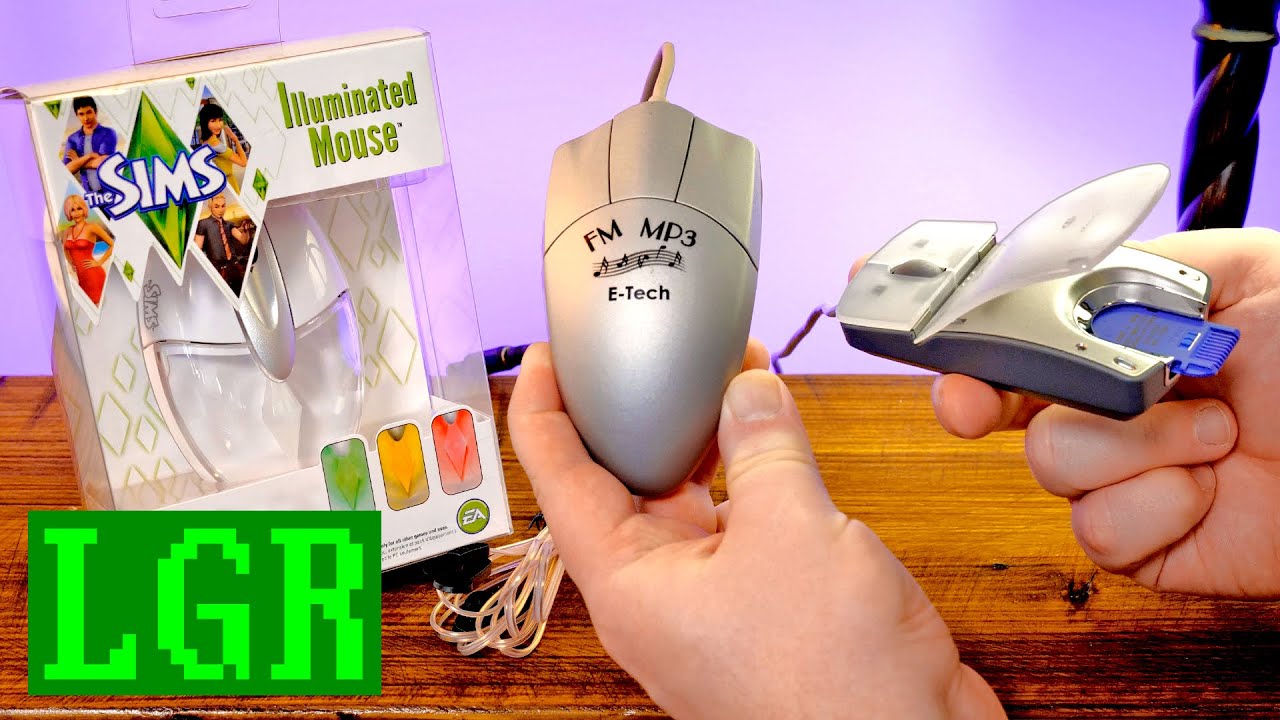
There's a bunch of these that Sony made, but this one in particular opens up, flips open to reveal a Memory Stick reader inside of there. And I've also got this. The Sims Illuminated Mood Mouse, which yeah, lights up a little plumbob inside there to match your sims' current mood in-game. And then there's this, which yeah, the FM MP3 Player Mouse, sort of. "FM 2000 Radio Mouse." It's an FM radio in a mouse!
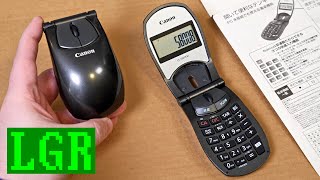
It's got its own antenna and stuff. Anyway, this is some weirdness, let's dive in. All right, let's take a look at this Sony Memory Stick Mouse for Windows 98 and beyond. A USB optical mouse with the whole thing being that it has a Memory Stick reader. It just flips open and you've got the reader right there instead of having to use some other external thing for Memory Sticks. There are a bunch of these.
Sony Memory Stick Mouse
This is the MSAC-US70, but I wanted one in this style in particular because I've frequently gotten emails and tweets and various mentions online from people saying, "Oh my goodness, you want a weird-looking mouse?" And so I've been wanting to get this for a while. It took me a while to find this one. I do have some other Memory Stick mouse devices because Sony was just all-in on this format.
And in case you're not aware, the Memory Stick was something introduced by Sony for use primarily in Sony devices late 1998, early 1999. Just as a competitor to all the other flash formats out there, used in lots of digital cameras, of course, but also media players, the PSP.
Y'know, it's just from that point in time where Sony was experimenting with proprietary formats and by "that point in time," I mean "forever and always." Sony has always done this. They can't seem to stop and I think they have a problem. But anyway, this seems to be a pretty straightforward mouse otherwise, but we'll see. You just never know, I've never used this, I've never opened it, it's still sealed.
Try to get this apart without completely ruining the packaging. Wow, surprising amount of paperwork and stuff. What in the world? I think it's just like, plastic welded shut. That was a bunch of dumbness to get apart, but anyway, there's the mouse, it's pretty small. Nice little clicks, kind of softened click, decent-ish wheel. It's just very small, very light. But yeah, this is the main attraction right here. Look at that!
Almost looks like it's supposed to be a fingerprint scanner or something. Now, the idea is that right there. Ooh, it's got a nice little spring-loaded bit. That's what that is. Just that Sony design, it's the whole fact that it opens and closes like that and it's stowed away and you got it right there without having to have another kind of memory card reader. Let's see what all this paperwork is about.
"For the customers using Windows XP." Yeah, the drivers aren't signed, I guess, or they're not verified for compatibility, but I guess they are. Yeah, 2002? Why didn't they just update the drivers? This manual here with 46 pages. It does have "SonicStage version 1.5, comprehensive software for enjoying music." I do remember a friend of mine had that, or something very similar to it that came with a Sony MiniDisc player.
And a proper CD, it's just a very– I almost thought it was like a burned thing by the blueness here, but no, that's the label. But yeah, let's go ahead and give this a try on a computer, see what kind of Memory Stickiness we get. All right, I got the LGR Megaluminum Monster going here.
The mouse is plugged in, Windows 98, and yeah, it just works straight away once I got the driver installed, yeah, this right here, Memory Stick USB reader/writer, the MSAC-US70, that's all it needed and it did install a couple of applications, of course, the Sonic Stage that we knew about, but also this Memory Stick Formatter application. And that's literally all it's for: formatting Memory Sticks, if ya got one. So let's put one in. Very satisfying mechanism.
There it is, 16 whole daggone megabytes. You can see in a previous life, it was quite likely used in a digital camera from Sony. But yeah, we can just go ahead and format there and get our space back. That's it, no need to do any kind of mounting or like un-whatever. You don't have to click anything to have it eject. It's just always ready to go. I immediately see the appeal.
This is really cool to have this if you had your devices with Memory Sticks or MagicGate. Of course, in terms of how it feels as a mouse and the accuracy, I mean, it should be no surprise that it's actually fantastic. Sony, I don't know if I've ever had a mouse from them that was bad. It's always at least tolerable. I don't know why I chose those colors. I should do some different ones, let's see.
Yeah, Sony mice, I've always enjoyed. This one is a little bit small for my taste. Of course, how about the "Duke Nukem" test?-"Let's rock." "Damn, those alien bastards are gonna pay for shooting up my-Wait, I have a Sony Memory Stick mouse. We gotta test this. That we do, Duke. Yeah, obviously no surprise that it's gonna be just fine for this as long as you're cool with the size of the mouse.
And it truly is just the size and a little bit of the shape that I don't like. Everything else is pretty great. And last, we got that SonicStage software, apparently version 1.5 from 2002 here. I gotta give it a shot 'cause I haven't used this in like literally decades. We should be able to write to the Memory Stick doing this. So let's give it a shot. Yeah. Oh, wow. It's just. all these transitions!
Anyway, we got our different sources like audio CDs or a music drive. I think this will count as the Memory Stick. So let's go to the record window and let's get a CD. And you know what, I had the perfect thing in mind, something I picked up in "LGR Thrifts Episode 50." This is the World Wrestling Federation Superstars "Wrestlemania:. The Album." A truly. inspiring bit of pop culture history I had no idea existed.
Honestly, I only want one track and that is track seven. Yeah, let's do right there. Record that. Oh, what? Windows 98! At it again! Oh man, all right, well, maybe we can't do that. All right, well, I tried a few different things and just does not wanna work with the Sony software. So, gonna go with good old EAC: Exact Audio Copy here. All right, we have it saved to our mouse for the Memory Stick within.
It's just actually a pretty good mouse with legit use for old memory cards. Well, let's take a look at this Sims mouse. I can tell it's supposed to be for or came out around the time of "The Sims 3" being the newest thing. But yeah, they took out the '3' and they're just like, "oh, it's just a 'The Sims' Mouse," Illuminated Mouse.
The Sims Illuminated Mood Mouse
Yeah, I remember when this came out, I had one and I used it like once and I was like, "This is kind of a fun little gimmick." You know, it's supposed to change the color of the LED in there to match the mood of your Sim. But yeah, I used it once and I was like, "It's not a good mouse" and then I put it away. That's made by Mad Catz.
I don't know if I realized that or remembered. Windows 7, Windows Vista, Windows XP. Oh, yeah, 2011, so about 13 years 'cause I used it right when it came out and that was it.
Anyway, I guess this only works with "The Sims 3." I know this is definitely meant to work with "The Sims 3." But I think it might also work with "The Sims 4" because there is an option in the menu for that game for using accessories like this. And there are other things too, like I also remember "The Sims" had this little external plumbob that you'd plug in to use. Yeah, that was a thing as well.
I think that was something that predated this, but then they used the idea and they just stuck it in a mouse. But yeah, let's get this open. The Sims 3 Illuminated Mouse and a bunch of languages. What have we got here? Installation, plug it in, download drivers from the Mad Catz website. Well. Oh, yeah, I remember, I remember now. This is, it just has this like kinda sharp plasticky edge.
The thing feels like it weighs absolutely nothing. The wheel is actually all right, the clicking is fine. Kind of harsh, but whatever. And then, yeah, just the whole feel of it, the look of it, everything about it screams toy, not an actual mouse. Of course, the biggest thing though is, you know, this lights up and matches your Sims color or the Sims mood color.
And in case you're not aware, yeah, you got this little plumbob in the game and it's like happy, not so happy, angry, more or less. The thing is, it's constantly covered up by your hand so you never see it. I mean, you see a little bit sort of glowing. Anyway, we'll see that. Let's plug it in and see how it goes. Let me give it a second shot years later.
All right, just reinstalled "The Sims 3" for the first time in forever. Let's get this plugged in. And as you can see here, it does start glowing right away. And if "The Sims 3" is not going, then it just cycles through the red, green and yellow colors. And that's all it does, unless you're playing the game. But yeah, just let it cycle through here. So yeah, not quite RGB, I guess it's more RGY?
But every minute or so it cycles through those just on its own and it's all it does until you get the drivers and a supported game going. So in terms of the drivers, well, Mad Catz unsurprisingly does not have it listed on their website anymore. However, I was able to find this file here. Yeah, it was on one of those shady driver websites. But yeah, I did actually get it working.
It shows up as a "Sims 3" Mood Mouse by Saitek even though it's a Mad Catz driver. Anyway, it works still with Windows 11. So yeah, let's just open "The Sims 3" here. And as soon as the game starts up, it actually turns off the LED or dims it all the way I guess 'cause it's still slightly glowing green. It won't actually turn back on again until you load up a game with some Sims.
So here we go. And well, yeah, just started up a save real quick earlier so I can get some Sims angry. And you can see it is glowing red here because we have Nancy Landgraab in kind of an angry mood. Jeffrey is also in an angry mood and he's green. Malcolm is not doing great either, but it's also green. But yeah, you can see as I click through them, it will actually change the color.
Poor Nancy, let's at least get her some food or something. Maybe if gets in a better food hunger state, she'll be turning into the yellow. Oh, there's a yellow. Okay, so yeah, for whatever reason at that point, it turned yellow there. I guess it really does just rely completely on the plumbob above their head as opposed to the color that's around their portrait over on the far left.
So that's a little confusing, but whatever, that's fine. Yellow, green, red. Sir, use the bathroom. But yeah, as you can see here, as I was saying earlier in terms of like just using it, it's pretty much covered up by your hand.
I mean, you can kind of see it on the side and, you know, I guess the wheel a little bit, but just by how I grip it at least, it's usually like this right here and there's not much to see. So, oh, well. It's a silly gimmick, but I guess it's kind of fun. I wish it was a better mouse is the thing. Oh, my goodness, this huge open world. Oh, it just keeps going.
This game is, it's so big and this is just the base game, like just the starting map. Yeah, like I was saying, it's a perfectly serviceable mouse. Go play in the fire. Yeah, it's not bad exactly. It's a little too sensitive on the clicks, like barely putting any pressure, just sort of, I don't know. And I don't like the sharpness here, again, it's just the way I hold a mouse I suppose.
The wheel's actually pretty good and the weight is just, it's far too light. Like it's one of those where, you know, the cord has barely moved and it just starts moving the whole dang mouse around. It's not a pleasant mouse to use, but, hey, it glows. If only it worked with other games. Well, maybe it does, let's try.
Guys, we got "The Sims 4" on here and like I said, I know that supports the plumbob USB thing and I think there might even have been a "Sims 4" glowing mouse, I don't know. There were some other products like a headset or something. Holy crap,. The Sims 4" loads so much faster. Dynamic lighting, turn that on. Let's see if this does anything.
Considering it's still just like glowing going through the motions or going through routine that it does when nothing is going, I'm assuming it might not work. All right, so yeah, just clicking on Duke Nukem there, he's got a green plumbob and it's still red. Hers is also green. His is yellow. Yeah, see even though, I mean, it's changing colors but that's just because it's going through the loop, the routine of its regular color changes.
So I guess this doesn't work with "The Sims 4." That's disappointing. I was really hoping that the dynamic lighting option would allow that, but I guess not. I guess that's just for the specific peripherals that "The Sims 4" wants to use. And this one,. The Sims Illuminated Mouse from 2011 doesn't work with it. Oh, well. Still, kind of almost neat in a way, sort of kind of.
E-Tech FM 2000 Radio Mouse
Now, this, this is a fascinating mouse because I've got so many questions and the only way to answer 'em really is to try it out. So this is the FM 2000 Radio Mouse with the most amazing packaging design ever. There's stuff on every single surface, not a single one of the sides has the same writing or text or images. I mean, talk about the whole "graphic design is my passion" meme personified.
"Specialized design for FM 2000 Radio Mouse." "Worldwide patents pending. High quality FM stereo radio with noise shielding technology for the multimedia PC environment. Easy to install, build in high sensitivity antenna." I just don't know what they mean by any of this exactly. Like it's clearly got, well, I don't know if it's super clear. I guess it's clear that it has a built-in FM receiver radio circuitry of some kind in the mouse, I guess.
I don't imagine that there's like separate components for that. I really just don't know because it says USB/RCA cable attached to FM mouse and then FM antenna. But here and on the front it says "build in" or built in is what they're trying to say, FM antenna. So is it in the mouse? Is it a separate FM thing and the mouse is just a mouse?
There's more questions the more you look at this and I've been wanting to get it apart and do just that for years. So let me see how I can do this without ruining it. See, I have so many different FM radio devices for PCs, but this is. Yeah, this is looking like an external antenna, which is like how all the other ones are, but.
Yeah, so we've got, that's not RCA, this is like a three and a half mil just pass-through thing with USB. So we've got audio here and then this, which plugs into this I suppose. So this is the FM radio antenna and you've got some suction cups. All right, so that kind of answers some questions sort of. Wow, this feels like it's made of greeting cards, just a cheap material. Anyway. PC 586/Pentium or higher.
Windows 2000/98, USB. Mouse goes into USB, plug FM mouse's female jack and RCA mono jack of T-type antenna. We're gonna look inside the mouse anyway, but I'm assuming there's nothing in here, except for radio components. And then just, they made the antenna external from this because that wouldn't make sense to have it all in here. You just wouldn't get very good reception.
And even though it is USB, this, I guess, is just for the mouse because it's saying to plug this into your sound card to get sound for the radio portion. So in effect, yeah this is like no different than any of the other FM radio devices that I have for PCs, which are usually just like a card or a USB plugin device that has the radio circuitry and an antenna.
This just happens to have some of those components built into a mouse for who knows what reason. It'd be one thing if there were speakers or something on the mouse, but no, there's not. Well, let's try it first before I take it all apart. It feels so cheap that I don't trust it to stay together. So we'll test it and then we'll take it apart. Oh, I just noticed the CD artwork too. Wonderful.
E-Tech USA, yeah, let's test this thing. You know I don't normally show the plugging in the mouse 'cause it's usually just USB or serial or PS/2 or something. But we got all this. So again, it says to put the T-type antenna up and out there and I'm gonna pad to all these pass-throughs. I assume the suction cups it wants me to put on a window, but I ain't got no windows here.
I mean, I got Windows 98. So yeah antenna plugs in right there and that'll go into the line in on the sound card. So the CD ROM brings up this here. You got a mouse utility and FM radio utilities for US/Europe and then also Japan, 'cause yeah they go to different frequencies. Kind of manual but, eh, you know, let's just do this. Sure. USB. Cool.
Well, been messing around with this for about an hour and it does not wanna work. So it keeps showing up as this ALLMOUSE serial mouse, even though it's a USB mouse and I selected USB and the software and the drivers, so uninstalled and reinstalled all those. Tried some of the other drivers on the CD and what it comes up with is this Allspirit ALLMOUSE PS/2 or serial.
Like I said, even though this is USB, so maybe there's just some built-in conversion from either PS/2 or serial. Either way, it's not working. Well, this is one reason I keep Windows Millennium Edition around believe it or not. And yeah, on here, it just worked straight away. It's under the mouse here as a Cypress USB mouse.
Now, with the ALLMOUSE software going here, it puts up this little ALLEYES, one of those little applet cursor tracker deals. Saw 'em a lot on Windows 3.195 shareware compilations. But yeah, the program itself for the mouse is really just an alternative version of the control panel from Windows, although you can change things like the mouse color and size and stuff here, you know, a fully transparent one an inverted one, a little tiny one.
And then you can change what the middle third mouse button does, so you can have a simulate keyboard presses of these specific keys or have it do a function, like a thing in Windows. So for instance, there we go, now it is a zoom button on your mouse. Handy stuff, although it is a little, these buttons are so sensitive that you barely like just barely touch 'em. I'm constantly misclicking.
Of course the main thing here is the FM mouse program itself and yeah it's working. We've got a radio. ♪ I'm on the highway to hell ♪ And you got your volume right here. Just going through the line in of the computer. And there you go, it's a FM radio. These are just stations I already had in there. I haven't put any of the local ones in.
But yeah, it's picking up everything local that I would expect it to. The scanning is really quite slow though. I mean, you can see there it's, yeah, it takes a sweet time. Ah, I keep middle clicking. Like I said, it's very easy to accidentally hit the wrong mouse button. Individual presets for whatever you wanna listen to and you can store those in there and you get alarms and on and off kind of stuff.
You can have it go through routines at certain times a day. How nice. This is actually fully functional. You also have this recording thing where you can just store things as WAV files and then there's a separate program that it installed to compress them to MP3s. So very basic MP3 compressor program. But yeah, record it in CD quality audio. ♪ He gets the party jumpin' ♪ Well, what do you know?
It's a mouse with an FM radio tuner, with some circuitry built in and it connects to the external antenna and that's what it is. Actually, as far as a mouse, I don't, dang it, I don't mind it, except for the stupid buttons. But I like the shape, I actually don't mind the weight and, you know, the ball itself is nice and accurate. No problems whatsoever in that aspect.
Of course, we got to open the thing up and see exactly what is in there in terms of the circuitry and radio stuff. So let's go ahead and do that. Unfortunately, the little piece that held the back end there was just some plastic, it was jammed in place and it just snapped 'cause I was pulling it apart earlier. But yeah, just very cheap, low cost mouse construction, no surprise there.
And for the most part, the mouse just looks like a mouse with the addition of those few radio components. So yeah, the rectangular chip with the white text, that's just a pretty standard USB mouse microcontroller, but the square chip right there that's kind of hard to read, that is a Phillips TEA5757 self tuned radio and it's pretty much just a radio on a chip with the ability to seek and go through the different stations on its own and it's small enough to fit inside of a mouse.
So I guess whatever company made this just figured, hey, why not? And, you know, it works pretty well for what it is. Having the external antenna and stuff certainly helps. I imagine it wouldn't be great if it were just all inside the mouse, but, you know, considering you just never know with this kind of packaging and like the cheapness and everything about it was slightly confusing, yeah, it's really not that bad.
The FM MP3 Mouse by E-Tech or Cypress or whoever the heck. It's fascinatingly okay. And well, that's about it for another one of these LGR weird mouse device videos. Another three down, another however the heck many in my collection. There are so many weird mice.
Let me know if there's any that I haven't covered that you want to see in the future perhaps or if you had any of these, particularly the weird radio mouse or if there's any more like it, I'm sure there has to be. But yeah, I hope you enjoyed watching this. I certainly enjoyed putting it together, you know, every so often, whenever there's nothing else quite ready to be finished up for the week. That is it for this one. And as always, thank you very much for watching LGR. Date: 2024-01-19
kepuexe1 1: 31 Exactly this post on X/Twitter was my inspiration to start the search for this mouse. I haven't found this exact model, but with the ability to read SD cards too, it would be a lot better. In the end I found a Sony MSAC-US7 from 2002, a notebook mouse with built in Memory Stick reader and a weird scrolling "wheel". 22: 56 I know this exact software from a standalone FM tuner for Windows PCs, but from the company D-Link. The recording function didn't even work properly. Something was broken. 25: 42 It's surprisingly neat to see a three-button-mouse with USB controller. Like a retro styled mouse for newer devices. Too bad that the build quality is not so good. I love that series of niche and weird mice. Hope there will be a lot more of them.
reply
Airsaber I knew I recognized the name from somewhere, and yup - there are still some cheap mice labelled as "E-Tech" being made! One of them a copy of a pretty good mouse that I owned under the name of "Speedlink Decus Gaming Mouse" - I guess this is why I even remember the name, haha. Anyway, I've always listened a lot to the radio, so I would've been beyond enthusiastic as a kid if someone had given me this mouse, especially since one of its functions is recording songs from the radio! The card reader mouse isn't such a bad concept, either, and I really like this milky translucent plastic on the top of the mouse.
reply
aeiouxs Oh god, SonicStage - kill me now. What a POS software; I bought a Sony nw-a1000 player around 2006, fought with the software for around a day trying to copy my legit music library to the device before returning the product because of its nasty UX and DRM obsessions (seem to remember it scrambled/encrypted files when copying over, so once it was copied, it was impossible to copy back if a fire had destroyed your house while you were out with it. or was that Apple too. Beautiful object the NWA1000 but SonicStage can get in the bin!
reply
albert_vds If the memory car mouse had all the usual memory card slots then it would have been awesome. Easy to reach and one less thing because it's now inside the mouse. The Sims mouse was the worst. Too bad the radio mouse was such a bad quality otherwise it would have been a great feature. But with streamable radio stations and the phasing out of FM to DAB it's not that useful anymore.
reply
steveinternetsteve I didn't have the weird radio mouse but I would have definitely wanted one of those as a kid. Thanks also for pointing out what kind of chip is in there that makes the radio work. I have a funny feeling you'll get an interesting nostalgic result if you hook in that radio mouse and a couple of those beige tower speakers with the felt like front covers.
reply
BenjiThatFoxGuy the dynamic lighting in Sims 4 is for the plumbob USB, the headset and Razer Chroma compatible peripherals. works on my Razer keyboard, at least it's visible at all times: D but yes it does the exact same thing! it does the mood color instead of the plumbob color though, cuz there's much more of them in sims 4 and modern stuff is fully rgb
reply
ember9361 hehe I have the driver for that sims 3 mouse, a friend gave it to me because they don't use it at all! I even did my first soldering job on it, to change the left clicker! It's super neat when playing sims 3 in the dark, and honestly It caught my attention a couple of times that my sims' moods were dipping! LOVE IT!
reply
paultapping9510 the mouse memory card makes more sense when you consider how inaccessible many case designs of the time made your ports. Just being able to slam in a memory card without having to have a dedicated peripheral or crawling on your hands and knees every time you wanted to read your card would have been exceptionally cool!
reply
OldManTheseDays When I was at university studying product design, one of the lessons we learned was the design fallacy of adding extraneous features into a product with the guise of making something innovative: its a TOASTER, with a CLOCK in it! It’s a LAWNMOWER, with a BATTERY CHARGER on it (etc, etc.
reply
doodlekaboodel The Sony memory stick was also used with various models of the AIBO (the virtual pet robot dog toy thing. Basically the sony stick held different programs which could change how your AIBO acted/responded, there's also a ton of custom software out there for them
reply
Metzli The sims mouse is actually a cool idea! But it looks so tiny compared to your hand xD It's a shame the quality seems so cheap. Wouldn't it also heat up on the zone with the light Could get uncomfortable when you're constantly resting your hand over a light source: s
reply
adamsavard535 That Sony mouse is actually awesome. I wish I had something like that in my modern mouse! The Sims mouse would be cool in a universe where the Sims would just use the existing RGB standards for modern mice. A shame it didnt work beyond a single game.
reply
n. stephan9848 The weirdest mouse I've got is an a4tech mouse with two scroll wheels. Pretty mild in comparison to all you've shown so far. I kind of like the concept of the sony mouse, I wouldn't mind a modern mouse with a micro sd slot or something like that.
reply
DanielleWhite I remember several tech devices with FM radios built-in from the 2000s. IIRC it had was a bundled function on an IC that did something else and some manufacturers decided to make the most of it. The Nokia N800 PDA was one such device that I had
reply
andrewbarratt8834 I love the early 2000s "cool" design of the Sony mouse. I could imagine Nsync using it in a music video, before it morphed into a ball of mercury, or some other noughties nonsense. On a space ship. With Destiny's Child. In the Matrix.
reply
ApostateOfMind42 I've always had a weird fascination with Sony mice. My most recent find was a Sony VAIO Mouse Talk VNC-X1A/W. How can a company make some of the best stuff while also making some of the most niche and oddball stuff simultaneously
reply
wolfnails666 Companies in 1998: Let's fit every port and accessories in small devices. Companies in 2024: We have to be forced by EU to have USB C and replaceable batteries. Don't ask about headphone jacks we just can't possibly fit it.
reply
bcyrx THE RADIO MOUSE IS SO DUMB! It could have just been an external fm tuner with software, why WHY THE MOUSE The program and functionality was actually pretty solid it seems, why tie it to a cheap mouse for no reason
reply
lazygamereviews I remember seeing stuff like this in the clearance bin of CompUSA. I also saw the game Blood in there. Best clearance purchase ever. That game still rules and now I'm almost 40 playing it on a Steam Deck. reply