• Vehicles • Fashion • Recipes • Blogs • Hunt • Travels • Sport • Fun • Handmade • IT • Education
Mini-Games
x

x
zakruti.com » IT - Software » Geeks Tutorial
How toRecover Word Document

How toRecover Word Document

FBTwitterReddit

video description

Rating: 4.0; Vote: 1
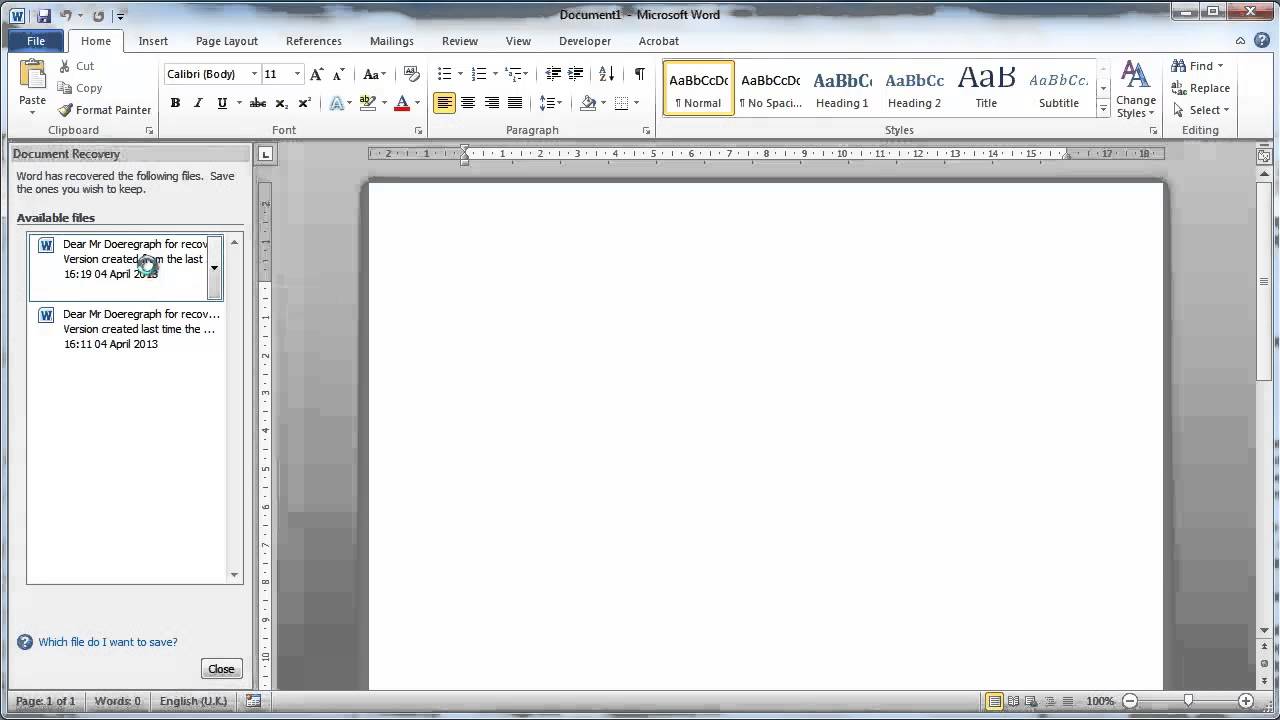
In this video tutorial we are going to show you how to recover a document in Word. This tutorial is going to look at how to recover Word document which can be very useful if you have lost work because you didn't save your document recently. Step # 1 -- Seeing Our Recovered Documents The Document Recovery feature of Word is a very easy to use element of the program. In this example here Word has just crashed and we are going to open it again. When we open the program we will see a panel on the left called Document Recovery which will contain any of the files we were working on when the program crashed. Step # 2 -- Restoring and Saving the Document Click the file and it will maximize on the right. Save the file to update your document with the unsaved changes then click Close on the Document Recovery frame. That is essentially how to recover Word document using auto recovery. Step # 3 -- Document Recovery Settings Let's now have a look at adjusting the settings for document recovery. Click File then Options and in the window that loads click on Save from the tabs on the left. You can easily set a new auto recovery time here which will make your computer save your document automatically more often -- here we will increase this frequency to every 5 minutes. To apply these settings click OK at the bottom of the window
Date: 2023-07-08

Comments and reviews: 3


um. I came here trying to figure out how to open an unsaved document not change how long it will be for the documents to auto save
reply

I was recommended by a friend of mine Availablespypro on IG for helping out with my documents that I lost few days ago,
reply

Availablespypro on IG he's real he just did a great job for new he's the perfect guy I can recommend
reply
Add a review, comment


Other channel videos