How to Check If Cell Contains Specific Text in Excel Adding the ISNUMBER Function
FBTwitterReddit
video description
Rating: 4.0; Vote: 1
we will teach you how to check if a cell contains a specific text in Excel.
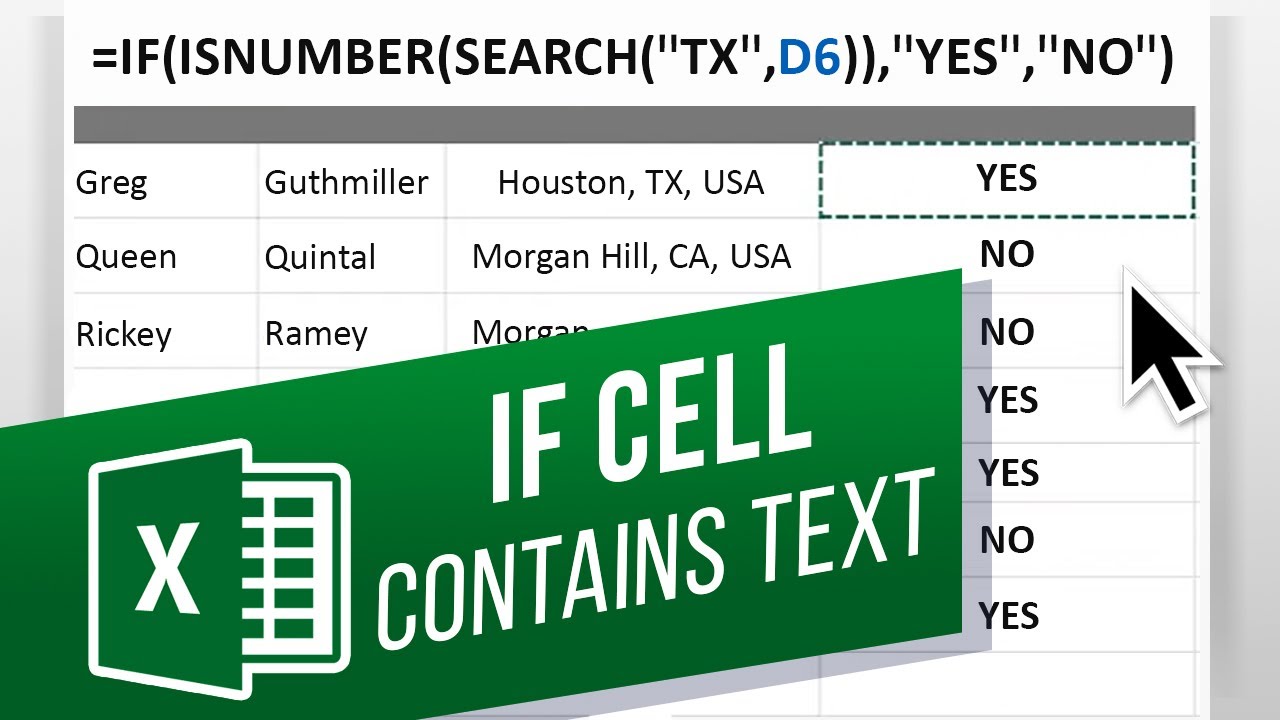
For that, we will be using the Search function to determine whether a specific text is present in a range of cells. Over here, we have a contact sheet with the addresses in one column. Lets say we want to identify which person in this sheet is located within Texas. For that, we will be using two functions to determine whether the abbreviation of Texas is located within any of these cells.
Lets start by selecting the cell here and entering the if function. After that, we will enter the search function, followed by brackets open. In inverted commas lets enter T X.
Next, lets enter comma and after that lets select the cell in which we want to search the text.
The search function returns a number, which means that it has found the text we entered in inverted commas here, and in this example - that means the person is located in Texas.
So within the IF function, lets add the IS NUMBER function in the beginning here. Now we can determine what the output would be if this argument is true or false.
If its true, then we want to return the values as YES. And if it is false, we want to return the value as NO. You can see over here, that we have entered each value in inverted commas, separated by a comma.
Lets hit enter, and here you can see that the formula has found the value we had entered in the search function. Lets copy and paste the formula in the entire sheet.
In this cell over here, you can see that the text T X is also present for another location, which is not Texas. Probably an error but your function should be able to handle that.
For that, a standard should be maintained within your data. For example, in this data you can see that the abbreviation of every state is followed by a comma.
So lets move back to the formula here, and within the search function, lets add a comma after T X.
Now lets paste the formula to the remaining cells, and over here you can see that it is correctly determining whether the person is located within Texas or not Date: 2023-07-08
Carmen What If I wanted column E to pull the state? So if it is TX, CA, or DE, column E would show which of those states is in column D and if not be blank or say none?
reply
Benjamin__ben__ what if i wanted to do the same for multiple text in a same cell? For Eg: I wanted to find TX, AND ALSO TEXT USA in same cell!
reply
Reyes What if I need to conditional format a range of digits within a text string. example text string 0, 2, 5, 0, 6
reply
wehbe hi if I want the name of the person who is living in TX displayed instead of yes or no? how can I do that? reply